A UAE E-Invoicing Integration Workflow for Odoo 19
An implementation outline covering invoice mapping, validation, and exchange through Peppol.
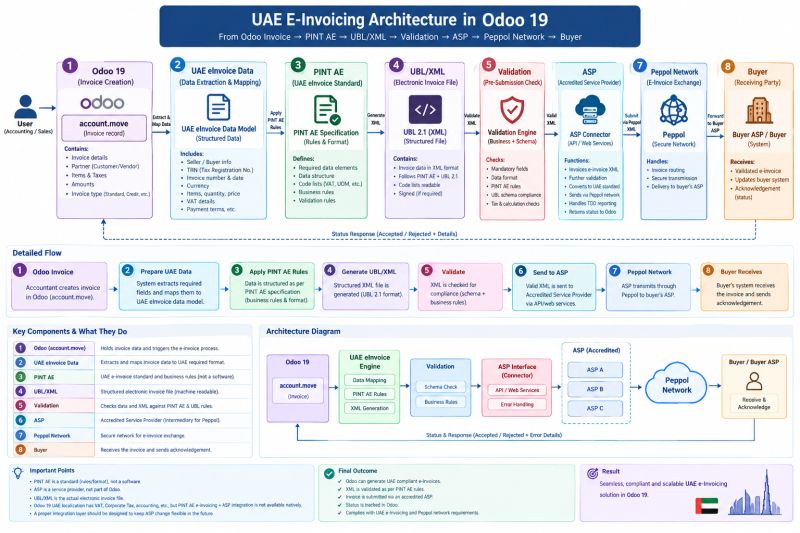
This post outlines an integration architecture for UAE e-invoicing in Odoo 19 using PINT AE and Peppol.
1. Create the invoice in Odoo using the accounting model account.move.
2. Map buyer and seller details, tax registration numbers, invoice amounts, and VAT into the e-invoice data model.
3. Apply the applicable PINT AE rules and generate a UBL 2.1 XML document.
4. Validate the file against the schema, relevant business rules, and tax calculations before transmission.
5. Send the validated document to an Accredited Service Provider (ASP) through its integration interface.
6. Exchange the document with the buyer’s provider over Peppol. Where the integration supports it, record returned statuses in Odoo.
Keeping the ASP connection in a dedicated integration layer makes it easier to change providers without rewriting the core invoicing workflow.